
Clean infected cPanel sites without breaking them
Zamfoo Malware Protect scans your accounts with the scanners already on your server, then repairs infected files before it quarantines anything. Every change keeps a verified backup, and every result is reported per account.
- 4 supported scanners
- Repair-first cleanup
- Verified backups
- Reseller & customer reports
Current interface, shown with sample data.
Four pages, one workflow
Scan, then review detections and cleanup, recover from quarantine, and report. Select a screenshot to enlarge it.
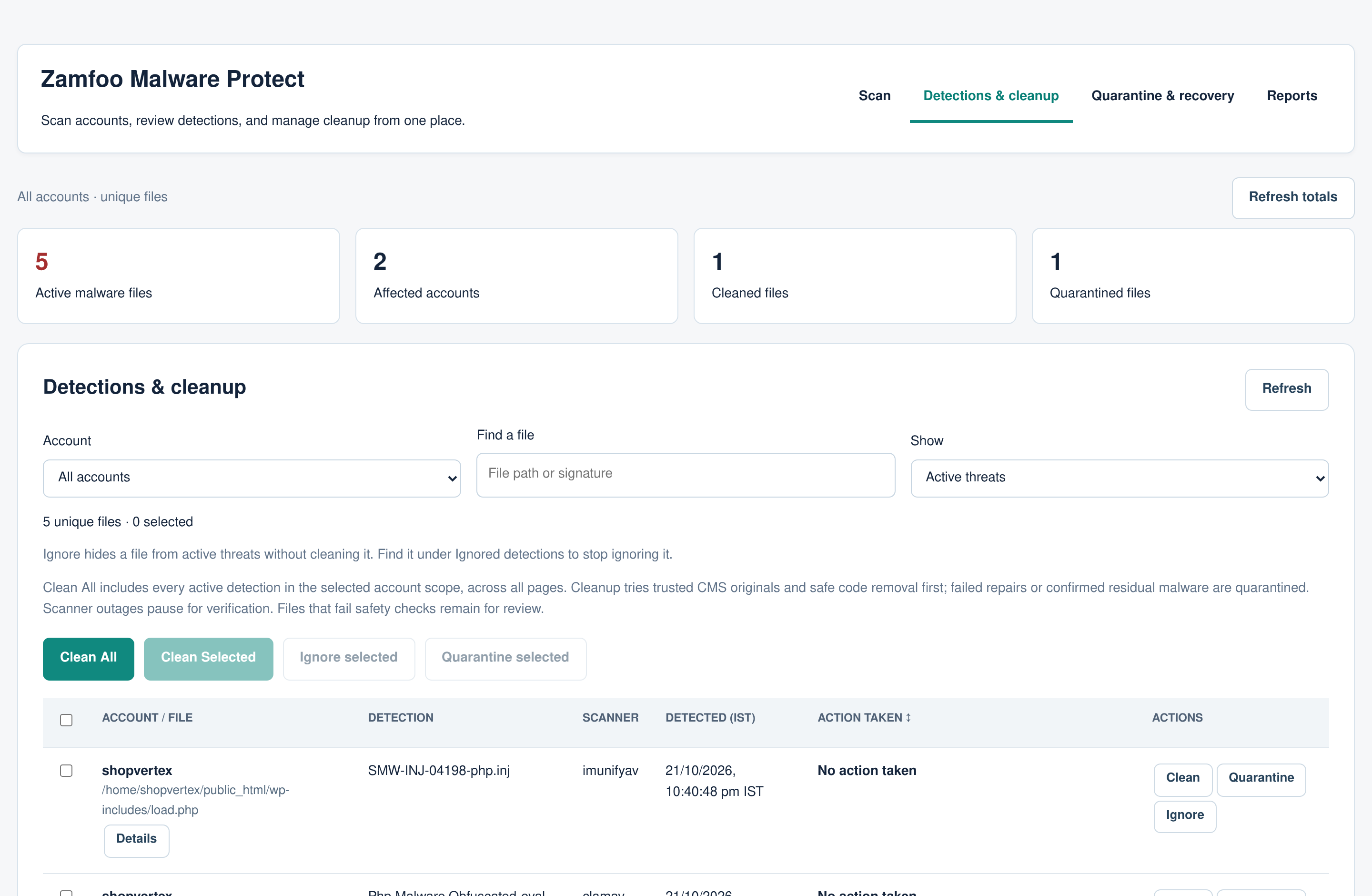
Every active detection, one row per file
Filter by account, file or status. Clean All covers every active detection in the selected scope across all pages; Clean Selected, Ignore and Quarantine act on the files you check.
- Summary cards: active malware files, affected accounts, cleaned and quarantined files
- Unique files: several signatures for the same file count once
- Action taken column, sortable, with the outcome and its time
See the proposed action for each file before anything changes
The review is bound to the exact detections and file contents you saw. If a file changes before cleanup runs, it is left for a new review.
- Restore a verified WordPress or Joomla original where one exists
- Remove injected code and keep the rest of the file
- Quarantine complete webshells or files that cannot be repaired
Every isolated file and recovery backup in one place
Filter by account, date, type and status. Restore or delete one copy or a selection across pages, with conflict checks before anything is overwritten.
- Quarantined files and the originals saved before each repair
- Restored copies stay listed until you delete them
- Delete removes the stored copy, never the live website file
Account reports you can share
Active, cleaned and quarantined files for every account, with cleanup and scan history per account and pending scan requests from customers.
- Export a summary CSV, a per-file CSV, or print / save as PDF
- Approve or reject scan requests from account owners
- Check website is a separate, explicit action
Repair first. Quarantine only when needed.
- 1 Scan
Report-only scans
Scans record detections and change nothing. Zamfoo will not start an ImunifyAV scan while ImunifyAV is set to clean files on its own, and LMD’s own quarantine and cleaning are turned off.
- 2 Review
You approve the plan
Clean All or Clean Selected shows each file’s proposed action. The plan is tied to the detections and file contents you reviewed.
- 3 Repair
Repair before quarantine
Complete webshells are isolated. Other files get a verified WordPress or Joomla original where possible, otherwise the injected code is removed. Files that fail repair or still contain malware are quarantined.
- 4 Verify
Verified, backed up, recorded
Each repaired file is rescanned before it counts as cleaned. Every change keeps a verified recovery backup. If the scanner is unavailable, files wait for verification instead of being marked clean.
Safety built in
- No file is changed or removed without a verified original backup.
- Ambiguous code and protected configuration files are left for manual review.
- A scanner outage never counts as a successful cleanup.
- Restores check for conflicts and never overwrite a newer file automatically.
- All cleanup, quarantine and restore actions are Root-only and recorded.
- A negative scan is not presented as proof that a website is clean.
Use the scanners already on your server
Choose an installed scanner for each scan. Results from every scanner are shown in one list and cleaned with the same workflow.
ImunifyAV
The free ImunifyAV scanner, or Imunify360, for PHP webshells, injected code and CMS infections. Scans run in report-only mode.
ClamAV
Signature scanning with clamscan, using your server’s ClamAV signature database.
Linux Malware Detect 2.x
LMD hash and pattern signatures for shared hosting threats, read from its JSON reports.
YARA 4.2+
Hosting indicator rules for obfuscated droppers and common backdoor patterns.
For your resellers
Resellers open Malware Protect in WHM and see reports for the accounts in their own branch: active, cleaned and quarantined files and cleanup history. They cannot see other branches or change anything.
For your customers
cPanel users get a Malware Reports page for their own account. They can download their report and request a scan, which you approve or reject in Reports.
Pricing
Included
Every Apex license, monthly or lifetime, includes Malware Protect at no extra cost, alongside every reseller tier and the Apex Operations Center.
Compare Zamfoo licenses$10.00/ month per server
For servers with a Master, Alpha or Super Alpha license, or without Zamfoo Reseller.
Order Malware ProtectFrequently asked questions
Is Malware Protect included with my license?
It is included free with every Apex license, monthly or lifetime. For Master, Alpha and Super Alpha servers, or servers without Zamfoo Reseller, it costs $10.00 per month per server.
Which scanners do I need?
At least one of ImunifyAV (or Imunify360), ClamAV, Linux Malware Detect 2.x or YARA 4.2+ installed on the server. Malware Protect lists the installed scanners and lets you choose one for each scan.
Will cleanup break customer websites?
Cleanup is designed to repair first: it restores verified originals or removes only the injected code, and keeps a verified backup of every file it changes. Files it cannot repair safely are left for review. No malware tool can guarantee a site keeps working, so use Check website and test the site after cleanup.
Can I undo a cleanup?
Yes. Quarantine & recovery holds the quarantined files and the original of every repaired file. You can restore a copy, after conflict checks, or delete it when you no longer need it. Restoring an infected original can bring the malware back.
What can resellers and customers see?
Resellers see reports for accounts in their own branch. cPanel users get a Malware Reports page with their own account’s report, which they can download, and can request a scan for Root to approve. Cleanup and settings stay with Root.
Does “no detections” mean an account is clean?
No. It means the selected scanner found nothing in the files it checked. Malware Protect says so in its reports and never labels an account clean on that basis alone.